
Agentic Mode
Agentic Mode lets you skip building a workflow entirely. Instead of defining every step yourself, you tell the AI what you want to achieve — in plain English — and it decides which tools to use, how many times, and in what order.How it works
When you start an Agentic run, the AI receives your goal and a list of every tool available. It then:- Reads your goal
- Decides which tool to call first
- Reads that tool’s output
- Decides what to do next based on what it found
- Repeats until the goal is complete
When to use Agentic Mode
| Use Agentic Mode when… | Use Workflow Mode when… |
|---|---|
| You want to explore a topic and aren’t sure what research steps are needed | You have a fixed, repeatable process |
| The right path depends on what the research turns up | You want guaranteed, predictable step execution |
| You want to move fast without configuring every step | Your team needs to understand exactly what runs |
| You’re doing one-off, exploratory research tasks | You’re running this agent on a schedule |
Starting an Agentic run
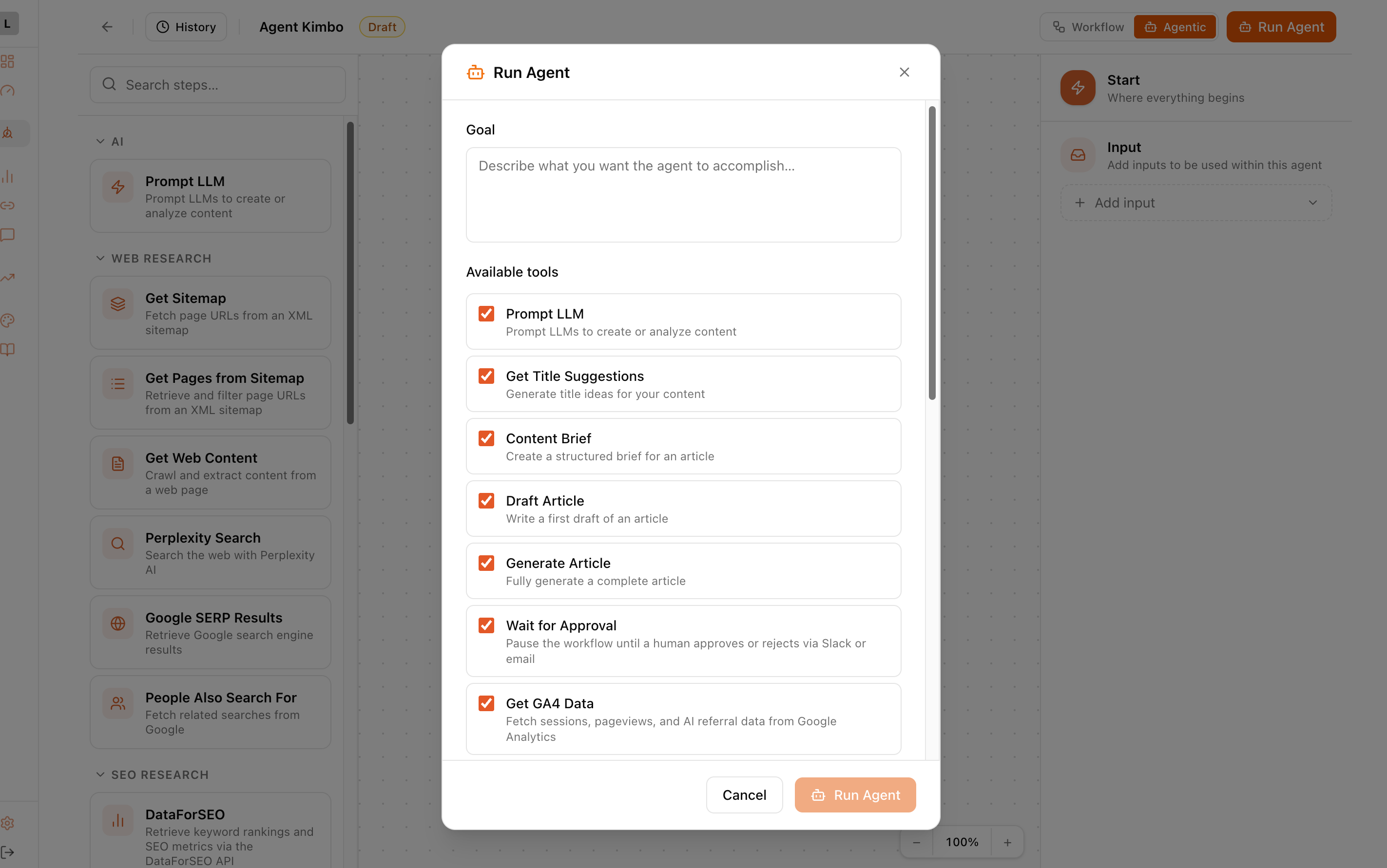
- Open your agent in the builder
- Click the Agentic toggle in the header (or click Run with AI if agentic mode is enabled)
- A dialog will appear asking for your goal
- Write your goal in plain English — be specific about what you want to create or find out
- Select which tools the AI is allowed to use (or leave all enabled)
- Click Start
Writing a good goal
The clearer your goal, the better the agent performs. Include:- What you want created — an article, a keyword list, a summary
- The topic — be specific
- Target audience or angle — if relevant
- Any constraints — word count, tone, format
Examples of good goals
Write a 2,000-word blog article about agentic marketing for B2B SaaS marketing managers. The article should be optimised to rank in AI search engines and explain what agentic marketing is, why it matters, and how to get started. Use keyword research to inform the topics covered.
Research the top 10 competitors in the project management software space. For each competitor, summarise their main content angle, what topics they cover well, and what gaps exist. Create a content brief for an article that fills the most significant gap.
Pull the last 7 days of GSC data for our site and identify the 5 keywords with the biggest impression-to-click gap — these are our best quick-win opportunities. For each keyword, suggest an article title and one-paragraph brief.
Examples of goals that are too vague
Write an article — (about what? for who?)
Do some SEO research — (for which keyword? what do you want to find?)
Help me with content — (what kind of content? what’s the goal?)
Choosing which tools to allow
When you start an Agentic run you can restrict which tools the AI can use. This is useful when:- You want to limit costs (e.g. disable DataForSEO if you don’t need keyword data)
- You know the task doesn’t require certain tools
- You want to control which external APIs are called
Watching a run
Agentic runs show each tool call and result in real time in the run panel. You can see:- Which tool the AI chose to call
- The arguments it passed (expand to see)
- The result that came back (click View result to see it formatted)
- The AI’s message after processing the result
Reviewing the output
When the run completes, the final AI message contains the finished output — your article, research summary, keyword list, or whatever you asked for. Click View result on any tool result to see the full data in a readable format. All agentic runs are saved to Run History so you can come back to them at any time.Tips
- If the AI keeps hitting dead ends (e.g. DataForSEO returns no data for a niche keyword), rephrase your goal to use broader terms.
- The AI reacts to what tools return. If a research step returns no useful data, the AI will typically try a different approach or explain the limitation.
- For content that needs human review before publishing, add a Wait for Approval step in a standard workflow instead of using Agentic Mode — Agentic Mode runs to completion without stopping.
- Agentic runs cost more in AI tokens than fixed workflows because the AI is reasoning between every step. For high-volume, scheduled tasks, build a Workflow instead.